【Egret Engine】簡単に使えるUnityライクなテンプレートの作成
はじめに
H5ゲームはUnityと比べてコーディングが難しいです。そこで、よく使う機能をまとめたEgret Engineのテンプレートを作成しました。
GitHubにも挙げておきますので、よかったら使ってください。
Egret Template
https://github.com/squmari/EgretTemplate
https://github.com/squmari/EgretTemplate
Egret EngineをできるだけUnityのように使えるコード作成しました。
以下のコードを参照しているので、こちらもごらんください。
参照したコード
https://github.com/liberapp-inc/h5g-ball-vs-blocks
準備
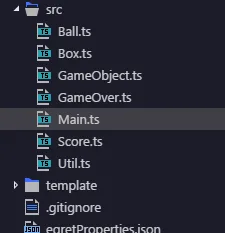
1、srcフォルダのMain以外を削除する。
新規プロジェクトを生成すると、いろんなスクリプトが入っていると思います。
Main以外は使わなくても大丈夫ですので消しましょう。
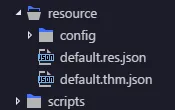
2、Resource/Assetフォルダ内にある画像を削除する。
Button等の画像が入っていますが、デフォルトで使うことはほとんどないと思います。200KB近くあるので消してしまいましょう。
Resource/eui_skinフォルダも同様です。
簡単に使えるUnityライクなテンプレートの作成
Main.ts
class Main extends eui.UILayer {

    public constructor() {
        super();
        this.once(egret.Event.ADDED_TO_STAGE, this.addToStage, this);
    }

    private addToStage() {

        GameObject.initial( this.stage );
        Util.init(this);
        Game.init();
        egret.startTick(this.tickLoop, this);
    }

    tickLoop(timeStamp:number):boolean{
        GameObject.update();
        return false;
    }

}

class Game{

    public static height: number;
    public static width: number;

    static init() {
        this.height = egret.MainContext.instance.stage.stageHeight;
        this.width  = egret.MainContext.instance.stage.stageWidth;

        /* new メソッドを記入*/
        new Background();
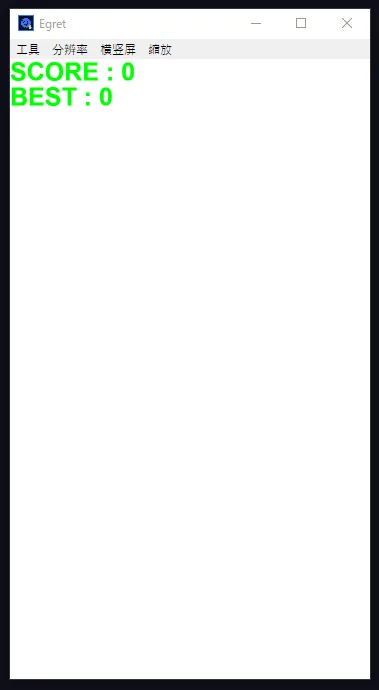
        new Score();

    }


}


class Background extends GameObject{

    constructor() {
        super();

        this.shape = new egret.Shape();
        this.shape.graphics.beginFill(Util.color(255,255,255));
        this.shape.graphics.drawRect(0, 0, Game.width, Game.height);
        this.shape.graphics.endFill();
        GameObject.display.addChild(this.shape);
    }

    updateContent() {}
}

class CreateWorld extends PhysicsObject{

    static I : CreateWorld = null;

    constructor() {
        super();
        CreateWorld.I = this;
        CreateWorld.world.on("beginContact",  this.collision, this);

    }
    createWorld(){
        CreateWorld.world = new p2.World();
        CreateWorld.world.sleepMode = p2.World.BODY_SLEEPING;
        CreateWorld.world.gravity = [0, 9.8];

    }

    static worldBegin(dt : number) :boolean{

        CreateWorld.world.step(1/60, dt/1000, 10);
        return false;
    }

    //コリジョンイベントはここにまとめる
    private collision(evt : any){

    }

    addDestroyMethod(){CreateWorld.world.clear();}

    updateContent(){}


}
Util.ts
// ゲームで便利に使えるUtilityクラス

class Util{

    public static height: number;
    public static width: number;
    public static ui:eui.UILayer;

    static init( eui:eui.UILayer ) {
        this.height = eui.stage.stageHeight;
        this.width  = eui.stage.stageWidth;
        this.ui = eui;
    }

    static random(min:number, max:number):number {
        return min + Math.random() * (max - min);
    }

    static randomInt(min:number, max:number):number {
        return Math.floor( min + Math.random() * (max+0.999 - min) );
    }

    static clamp(value:number, min:number, max:number):number {
        if( value < min ) value = min;
        if( value > max ) value = max;
        return value;
    }

    //rgbを16進数へ変換
    static color( r:number, g:number, b:number):number {
        //小数点の切り捨て
        let r16 = r.toFixed(0);
        let g16 = g.toFixed(0);
        let b16 = b.toFixed(0);

        //16進数へ変換
        r16 = r.toString(16);
        g16 = g.toString(16);
        b16 = b.toString(16);

        //r = 0だと r16 =0なので00にするために'00'加算
        r16 = ('00' + r16).slice(-2);
        g16 = ('00' + g16).slice(-2);
        b16 = ('00' + b16).slice(-2);

        //色コードへ変換
        let code :number = parseInt(("0x" +r16 + g16 + b16), 16) ;

        return code;
    }


    static myText(x:number, y:number, text:string, size:number, ratio:number, color:number, bold:boolean): egret.TextField {

        let tf :egret.TextField = new egret.TextField();
        tf.x = x;
        tf.y = y;
        tf.text = text;
        tf.bold = bold;
        tf.size = size;

        tf.scaleX = ratio;
        tf.scaleY = ratio;

        tf.textColor = color;


        return tf;
    }

    static myStrokeText(x:number, y:number, text:string, size:number, ratio:number, color:number, font:string, stColor:number, stSize:number): egret.TextField {

        let tf :egret.TextField = new egret.TextField();
        tf.x = x;
        tf.y = y;

        tf.scaleX = ratio;
        tf.scaleY = ratio;
        tf.textFlow = <Array<egret.ITextElement>>[
            {text: text,
                style: {
                    "textColor": color, "size": size, "fontFamily": font, "strokeColor": stColor, "stroke": stSize,
                }
            }
        ];

        return tf;
    }


}
GameObject.ts
// UnityのGameObjectライクなタスク管理クラス
//  update()に毎フレームの処理を書く
//  オブジェクトを破棄するときはdestroy()を呼ぶ
//  破棄のときに後処理が必要なら、addDestroyMethod()に記述
//  生成時の初期化はUnityと違い、constructor()を使う(引数を渡せる)
//  シーンを切り替えたい場合は transitにシーンロード関数を設定(全オブジェクトを破棄してからtransitを実行)

abstract class GameObject {

    public shape:egret.Shape = null;

    public static objects: GameObject[] = [];
    public static display: egret.DisplayObjectContainer;
    public static transit:()=>void;
    protected destroyFlag : boolean = false;

    constructor() {
        GameObject.objects.push(this);
    }


    static initial(displayObjectContainer: egret.DisplayObjectContainer){
        GameObject.objects = [];
        GameObject.display = displayObjectContainer;
    }

    abstract updateContent() : void;

    static update(){
        //繰り返しメソッド
        GameObject.objects.forEach(obj => obj.updateContent());

        //destroyFlagがtrueならshapeを削除
        GameObject.objects = GameObject.objects.filter( obj =>{
            if( obj.destroyFlag ) obj.delete();
            return ( !obj.destroyFlag );
        } );

        if( GameObject.transit ) {
            GameObject.allDestroy();
            GameObject.transit();
            GameObject.transit = null;
        }

    }

    static allDestroy(){
        GameObject.objects = GameObject.objects.filter( obj => {
            obj.destroy();
            obj.delete();
            return false;
        });
    }

    //オブジェクトを削除
    destroy() { this.destroyFlag = true; }

    //shapeの削除など、destroy後に後処理が必要なら記述
    addDestroyMethod(){}

    private delete(){
        this.addDestroyMethod();
        if( this.shape ){
            GameObject.display.removeChild(this.shape);
            this.shape = null;
        }
    }

}

abstract class PhysicsObject extends GameObject{

    protected body : p2.Body = null;
    protected bodyShape : p2.Circle | p2.Box = null;
    protected static world : p2.World = null;

    constructor(){
        super();
    }

    abstract updateContent() : void;

    addDestroyMethod(){
        CreateWorld.world.removeBody(this.body);
    }


}
Score.ts
class Score extends GameObject{

    static I:Score = null;   // singleton instance

    score:number = 0;

    bestScore:number = 0;
    text:egret.TextField = null;
    textBest:egret.TextField = null;

    textColor : number = 0x00FF3B;

    constructor() {
        super();

        this.textColor = Util.color(0,255,0);

        Score.I = this;
        this.score = 0;
        this.text = Util.myText(0, 0, "SCORE : 0", 100, 0.5, this.textColor, true);
        GameObject.display.addChild( this.text );

        let bestScore = window.localStorage.getItem("bestScore"); // string
        if( bestScore == null ){
            bestScore = "0";
            window.localStorage.setItem("bestScore", bestScore);
        }
        this.bestScore = parseInt( bestScore );
        this.textBest = Util.myText(0, 50, "BEST : " + bestScore, 100, 0.5, this.textColor, true);
        GameObject.display.addChild( this.textBest );
    }

    onDestroy() {
        GameObject.display.removeChild( this.text );
        this.text = null;
        GameObject.display.removeChild( this.textBest );
        this.textBest = null;
    }

    updateContent() {
        this.text.text = "SCORE : " + this.score.toFixed();
        if( this.bestScore < this.score ){
            this.bestScore = this.score;
            this.textBest.text = "BEST : " + this.score.toFixed();
        }
    }

    addScore(){
        this.score += 1;

    }


}
GameOver.ts
class GameOver extends GameObject{

    textGameOver:egret.TextField = null;
    textScore:egret.TextField = null;
    textColor : number = 0x00FF3B;

    constructor() {
        super();

        this.textGameOver = Util.myText(Game.width/2, Game.height/2 - 50, "GAME OVER", 100, 0.5, this.textColor, true);
        this.textGameOver.anchorOffsetX = this.textGameOver.width/2;
        this.textGameOver.anchorOffsetY = this.textGameOver.height/2;
        GameObject.display.addChild( this.textGameOver );

        this.textScore = Util.myText(Game.width/2, Game.height/2 + 50, "SCORE : " + Score.I.score, 100, 0.5, this.textColor, true);
        this.textScore.anchorOffsetX = this.textScore.width/2;
        this.textScore.anchorOffsetY = this.textScore.height/2;
        GameObject.display.addChild( this.textScore );

        if( Score.I.score >= Score.I.bestScore ){
            window.localStorage.setItem("bestScore", Score.I.score.toFixed() ); // string
        }

        GameObject.display.once(egret.TouchEvent.TOUCH_TAP, (e: egret.TouchEvent) => this.tap(e), this);
    }

    onDestroy() {
        GameObject.display.removeChild( this.textGameOver );
        this.textGameOver = null;
        GameObject.display.removeChild( this.textScore );
        this.textScore = null;
    }

    updateContent() {
        GameObject.display.addChild( this.textGameOver );
        GameObject.display.addChild( this.textScore );

     }

    tap(e:egret.TouchEvent){
        GameObject.transit = Game.init;
        this.destroy();
    }
}
Ball.ts
class Ball extends GameObject{

    static I:Ball = null;   // singleton instance
    private radius :number =null;

    constructor(x : number, y:number, radius:number) {
        super();

        //Ball.I = this;
        this.setShape(x, y, radius);

    }


    setShape(x: number, y:number, radius: number){
        if( this.shape ){
            GameObject.display.removeChild(this.shape);
        }

        this.shape = new egret.Shape();
        this.shape.x = x;
        this.shape.y = y;
        this.shape.graphics.beginFill(0xff0000);
        this.shape.graphics.drawCircle(0, 0, radius);
        this.shape.graphics.endFill();
        GameObject.display.addChild(this.shape);

    }


    updateContent(){

    }


}

abstract class PhysicsBall extends PhysicsObject{

    //static I:PhysicsBall = null;   // singleton instance
    private radius :number =null;

    constructor(x : number, y:number, radius:number) {
        super();

        //PhysicsBall.I = this;
        this.setBody(x, y, radius);
        this.setShape(x, y, radius);

    }

    private setBody(x: number, y:number, radius: number){

        this.body = new p2.Body({mass : 1, position:[x,y]});
        this.bodyShape = new p2.Circle({
            radius : radius, fixedRotation:true
        });
        this.body.addShape(this.bodyShape);
        CreateWorld.world.addBody(this.body);

    }

    private setShape(x: number, y:number, radius: number){
        if( this.shape ){
            GameObject.display.removeChild(this.shape);
        }

        this.shape = new egret.Shape();
        this.shape.x = x;
        this.shape.y = y;
        this.shape.graphics.beginFill(0xff0000);
        this.shape.graphics.drawCircle(0, 0, radius);
        this.shape.graphics.endFill();
        GameObject.display.addChild(this.shape);

    }


}

class MyBall extends Ball{
    constructor(x : number, y:number, radius:number) {
        super(x, y, radius);
        Ball.I = this;

    }
}
Box.ts
class Box extends GameObject{

    constructor(x : number, y : number, width : number, height : number, color:number) {
        super();
        this.setShape(x, y, width, height, color);


    }

    setShape(x : number, y : number, width : number, height : number, color:number){
        if( this.shape ){
            GameObject.display.removeChild(this.shape);
        }

        this.shape = new egret.Shape();
        this.shape.x = x;
        this.shape.y = y;
        this.shape.graphics.beginFill(color);
        this.shape.graphics.drawRect(0, 0, width , height);
        this.shape.graphics.endFill();
        GameObject.display.addChild(this.shape);

    }

    updateContent(){};

}


abstract class PhysicsBox extends PhysicsObject{

    protected width :number;
    protected height :number;
    protected x : number;
    protected y : number;
    protected color : number;


    constructor(x : number, y : number, width : number, height : number, color:number) {
        super();
        this.x = x;
        this.y = y;
        this.width = width ;
        this.height =height;
        this.color = color;
        this.setShape(this.width, this.height);


    }

    private setBody(x : number, y : number, width : number, height : number){

        this.body = new p2.Body({mass : 1, position:[x,y], type:p2.Body.STATIC});
        this.bodyShape = new p2.Box({
            width : width, height: height
        });
        this.body.addShape(this.bodyShape);
        CreateWorld.world.addBody(this.body);

    }


    setShape(width: number, height : number){
        if( this.shape ){
            GameObject.display.removeChild(this.shape);
        }

        this.shape = new egret.Shape();
        this.shape.anchorOffsetX += width/2;
        this.shape.anchorOffsetY += height/2;
        this.shape.x = this.body.position[0];
        this.shape.y = this.body.position[1];
        this.shape.graphics.beginFill(this.color);
        this.shape.graphics.drawRect(0, 0, width , height);
        this.shape.graphics.endFill();
        GameObject.display.addChild(this.shape);

    }


}

class MyBox extends Box{
    constructor(x : number, y : number, width : number, height : number, color:number) {
        super(x, y, width, height, color);
    }
}
使い方
オブジェクトのインスタンス化
Main.ts
class Game{

    public static height: number;
    public static width: number;

    static init() {
        this.height = egret.MainContext.instance.stage.stageHeight;
        this.width  = egret.MainContext.instance.stage.stageWidth;

        /* new メソッドを記入*/
        new Background();
        new Score();

    }


}
Main.tsのGameクラスのinit()内にnewしてください。init()はゲームをリセットしたり、リトライするときに使用します。
オブジェクトの削除
GameObject.ts
abstract class GameObject {

    public shape:egret.Shape = null;

    public static objects: GameObject[] = [];
    public static display: egret.DisplayObjectContainer;
    public static transit:()=>void;
    protected destroyFlag : boolean = false;

    constructor() {
        GameObject.objects.push(this);
    }


    static initial(displayObjectContainer: egret.DisplayObjectContainer){
        GameObject.objects = [];
        GameObject.display = displayObjectContainer;
    }

    abstract updateContent() : void;

    static update(){
        //繰り返しメソッド
        GameObject.objects.forEach(obj => obj.updateContent());

        //destroyFlagがtrueならshapeを削除
        GameObject.objects = GameObject.objects.filter( obj =>{
            if( obj.destroyFlag ) obj.delete();
            return ( !obj.destroyFlag );
        } );

        if( GameObject.transit ) {
            GameObject.allDestroy();
            GameObject.transit();
            GameObject.transit = null;
        }

    }

    static allDestroy(){
        GameObject.objects = GameObject.objects.filter( obj => {
            obj.destroy();
            obj.delete();
            return false;
        });
    }

    //オブジェクトを削除
    destroy() { this.destroyFlag = true; }

    //shapeの削除など、destroy後に後処理が必要なら記述
    addDestroyMethod(){}

    private delete(){
        this.addDestroyMethod();
        if( this.shape ){
            GameObject.display.removeChild(this.shape);
            this.shape = null;
        }
    }

}
BallもBoxもGameObjectクラスを継承しております。
オブジェクトを削除するときは destroy()メソッドを使用してください。
インスタンス化されたオブジェクトはstatic objectsにpushされてますので、destroyFlagがtrueになると、オブジェクトが削除されます。
なお、GameObjectはabstruct(抽象メソッド)ですので、継承した場合はupdateContent(){}をクラス内に追加してください。
このupdateContent(){}に記入されたメソッドはUnityのupdate()のように繰り返されます。
メソッドの連続実行
Main.ts
class Main extends eui.UILayer {

    public constructor() {
        super();
        this.once(egret.Event.ADDED_TO_STAGE, this.addToStage, this);
    }

    private addToStage() {

        GameObject.initial( this.stage );
        Util.init(this);
        Game.init();
        egret.startTick(this.tickLoop, this);
    }

    tickLoop(timeStamp:number):boolean{
        GameObject.update();
        return false;
    }

}
GameObject.ts
    static update(){
        //繰り返しメソッド
        GameObject.objects.forEach(obj => obj.updateContent());

        //destroyFlagがtrueならshapeを削除
        GameObject.objects = GameObject.objects.filter( obj =>{
            if( obj.destroyFlag ) obj.delete();
            return ( !obj.destroyFlag );
        } );

        if( GameObject.transit ) {
            GameObject.allDestroy();
            GameObject.transit();
            GameObject.transit = null;
        }

    }
Unityのupdate関数のように、常にメソッドを連続実行したい場合は、BallやBox内のupdateContent(){}に関数を記載してください。
GameObject.update()がMainでtickLoopされて、フレームレート60で繰り返されます。
GameObjectを継承した場合は、updateContent(){}を追加しないとエラーになりますので、繰り返しをしない場合でも空メソッドとして追記してください。
シーンの切り替え
GameOver.ts
    tap(e:egret.TouchEvent){
        GameObject.transit = Game.init;
        this.destroy();
    }
GameObject.ts
    static update(){
        //繰り返しメソッド
        GameObject.objects.forEach(obj => obj.updateContent());

        //destroyFlagがtrueならshapeを削除
        GameObject.objects = GameObject.objects.filter( obj =>{
            if( obj.destroyFlag ) obj.delete();
            return ( !obj.destroyFlag );
        } );

        if( GameObject.transit ) {
            GameObject.allDestroy();
            GameObject.transit();
            GameObject.transit = null;
        }

    }
シーンを切り替えるときはGameObject.transit = 関数; のように利用します。
allDestroyでGameObject系を全て削除した後、transitに代入した関数が実行されます。
リトライするときはinit()を代入するといいでしょう。