【Egret Engine】テキストを表示する方法「eui.Label()」
2018-12-22
はじめに
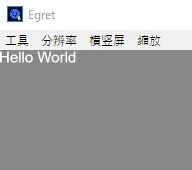
この記事では「eui.Label」を使用して「Hello World」を表示させます。
準備
1、新規Projectの作成
【Egret Wing】新規Projectの作成とエディタの使い方を参考にして、新規Projectを作成してください。
私は「TestProject」という名前で作成しました。
2、不要ファイルの削除
【Egret Engine】TypeScript の基礎を参考にして、asset等の不要ファイルやコードを削除してください。
テキストを表示する方法
Main.ts
class Main extends eui.UILayer {

    public constructor() {
        super();
        this.once(egret.Event.ADDED_TO_STAGE, this.addToStage, this);

    }

    private addToStage() {
        Game.init(this.stage);

        egret.startTick(this.tickLoop, this);
    }

    tickLoop(timeStamp:number):boolean{
        return false;
    }

}

class Game{

    static I : Game;
    static mainStage: egret.Stage;
    static height: number;
    static width: number;

    static init(stage:egret.Stage) {

        Game.I = this;
        Game.height = egret.MainContext.instance.stage.stageHeight;
        Game.width  = egret.MainContext.instance.stage.stageWidth;
        Game.mainStage = stage;

        /* メソッドなどを記入*/
        new UILayer();
        new Hello();

    }


}

class UILayer{

    static display: eui.UILayer = null;

    constructor(){
        this.initial();
    }

    initial(){
        UILayer.display = new eui.UILayer();
        Game.mainStage.addChild(UILayer.display);
    }


}

class UICompornent extends egret.DisplayObjectContainer{

    display: egret.DisplayObjectContainer = null;
    static compornents: UICompornent[] = [];

    constructor(){
        super();
        this.initial();
    }

    initial(){
        this.display = new egret.DisplayObjectContainer();
        UILayer.display.addChild(this.display);
        UICompornent.compornents.push(this);
    }

}

class Hello extends UICompornent{

    constructor(){
        super();
        this.method();
    }

    method(){
        let hello:eui.Label = new eui.Label();
        hello.text = "Hello World";
        this.display.addChild(hello);
    }

}
テキストやボタンなどのUI(ユーザーインターフェース)は常に前面に表示する必要があります。なので、図形などを表示するレイヤーとUI用のレイヤーは分けた方がいいと思います。
今回はUIレイヤーのみ生成していきます。
1、UILayerの生成
class UILayer extends eui.UILayer{

    static display: eui.UILayer = null;

    constructor(){
        super();
        this.initial();
    }

    initial(){
        UILayer.display = new eui.UILayer();
        Game.mainStage.addChild(UILayer.display);
    }


}
Game.mainStage = Main.stageです。このmainStageにUI用のレイヤーを乗せます。
2、UILayerCompornentクラスの生成
class UICompornent extends egret.DisplayObjectContainer{

    display: egret.DisplayObjectContainer = null;
    static compornents: UICompornent[] = [];

    constructor(){
        super();
        this.initial();
    }

    initial(){
        this.display = new egret.DisplayObjectContainer();
        UILayer.display.addChild(this.display);
        UICompornent.compornents.push(this);
    }

}
UILayerへテキストやボタンを表示させる場合はこのUILayerCompornentを継承してください。
これを継承すると、自動的にUILayerへ挿入されます。
3、テキストの表示
class Hello extends UICompornent{

    constructor(){
        super();
        this.method();
    }

    method(){
        let hello:eui.Label = new eui.Label();
        hello.text = "Hello World";
        this.display.addChild(hello);
    }

}
UILayerCompornentを継承し、eui.Label型のテキストをインスタンス化してください。
テキストの拡大や移動は、
//textの移動
hello.x = 300;
hello.y = 100;

//サイズ変更
hello.size = 50;

//色の変更
hello.textColor = 0xff0000;で行えます。その他にも色々ありますので詳しくは公式APIを参照してください。
参考URL
公式 EgretEngine API
EDN Egret Developer Network
http://edn.egret.com/cn/article/index/id/639
Egret Developer 例
http://developer.egret.com/cn/example/page/index#110-text-color