【Unity, Teddy, 3Dモデリング】Teddy をプログラミングなしで使ってみた
2018-10-27
はじめに
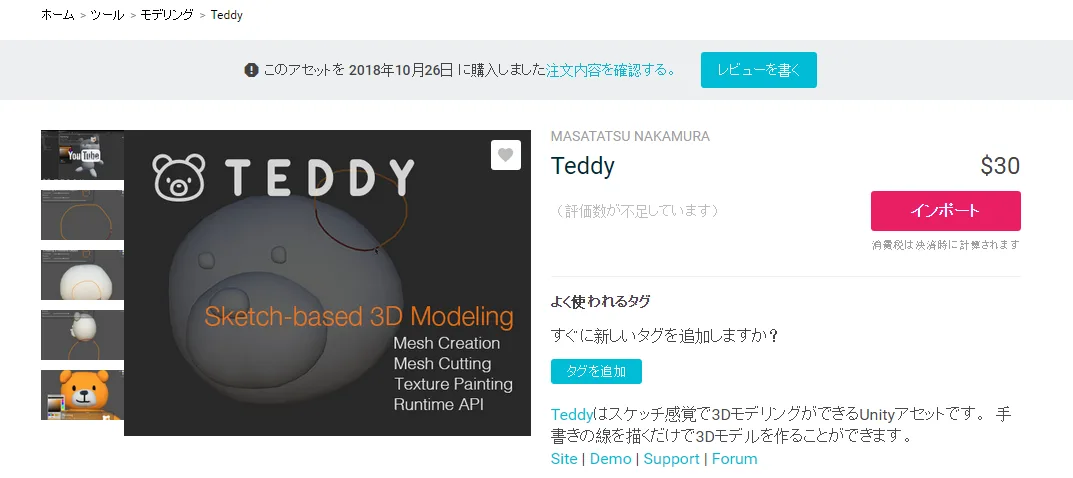
この記事ではUnityのAssetであるTeddyを使い方を紹介します。
Teddyの挿入
Teddyをアセットストアからインポートしたら、
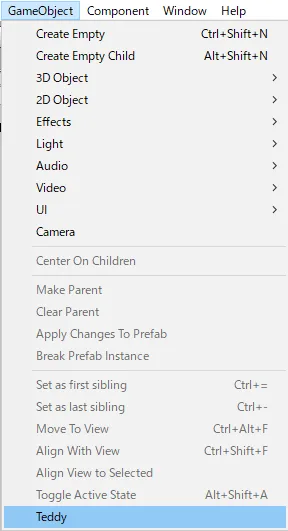
GameObject > Teddy を選択してください。
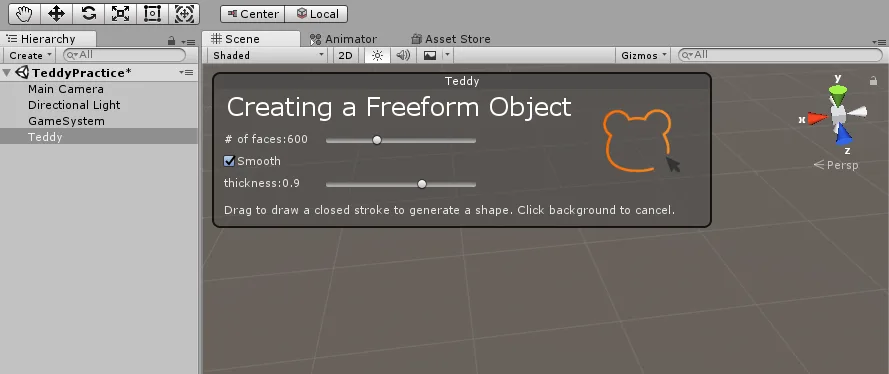
すると、Hierarchy に「Teddy」が生成されて、
Scene に「Creating a Freeform Object」ウインドウが表示されます。
後はマウスをドラッグして絵を書くだけです。
Teddyの操作方法
基本的な操作は公式のチュートリアルに書いてあるので、
映像でざっくりと説明します。
オブジェクトの生成
操作はドラッグのみです。
# of faces:
立体化されたメッシュ面の数です。
これが増えるとより滑らかになりますが、CPUの負荷が大きくなるので、最低値で十分だと思います。
Smooth
生成したオブジェクトの面取りを行います。
thickness :
生成したオブジェクトの厚みを変えます。
オブジェクトのカッティング
Cut ボタンを押してからドラッグするだけです。
オブジェクトのペイント
オブジェクトを選択して色を選び、ドラッグで描けます。
公式API
      // Create 3D Mesh from noise applied circumference.

                using System.Collections;
                using System.Collections.Generic;

                using UnityEngine;

                using Teddy;

                public class Example : MonoBehaviour {
                    public float radius = 1f;
                	void Start () {
                        var points = new List<Vector2>();
                        var pi2 = Mathf.PI * 2f;
                        for(float r = 0f; r < pi2; r += (pi2 / 20f)) {
                            var x = Mathf.Cos(r);
                            var y = Mathf.Sin(r);
                            points.Add((new Vector2(x, y)).normalized * (1.0f + radius * Mathf.PerlinNoise(r, 0f)));
                        }
                        var filter = gameObject.AddComponent<MeshFilter>();
                        filter.sharedMesh = TeddyUtility.CreateMesh(points, 600, 0.85f);
                	}
                }
私の場合、これをそのままアタッチしても動かすことができませんでした。
とりあえず、Demoシーンを見てみたいを思います。
TeddyRuntimeDemo.cs
using UnityEngine;
using UnityEngine.EventSystems;

using System;
using System.Linq;
using System.Collections;
//List用
using System.Collections.Generic;

using Teddy;

namespace TeddyDemo
{

    public class TeddyRuntimeDemo : MonoBehaviour {

        public enum OperationMode
        {
            Default,
            Draw,
            Move,
            Cut
        };

        [SerializeField] new Camera camera;
        [SerializeField] Shader lineShader;
        [SerializeField] GameObject prefab;
        [SerializeField] bool simulate;

        Material lineMat;

        OperationMode mode;

        List<Vector2> screenpoints;
        List<Vector3> points;
        List<Puppet> puppets;

        Puppet selected;
        Vector3 origin;
        Vector3 startPoint;

        const float zOffset = 10f;

        void Start () {
            //カメラが無いなら追加
            if(camera == null) {
                camera = Camera.main;
            }

            screenpoints = new List<Vector2>();
            points = new List<Vector3>();
            puppets = new List<Puppet>();
            lineMat = new Material(lineShader);
        }

        void Update () {
            //ボタンなどのuGUIをクリックしたときは画面クリックを無視する
            if (EventSystem.current.IsPointerOverGameObject()) return;

            //マウスの座標を取得
            var screen = Input.mousePosition;


            switch (mode)
            {

                case OperationMode.Default:

                    if (Input.GetMouseButtonDown(0))
                    {
                        //Listを全て消去
                        points.Clear();
						screenpoints.Clear();

                        // メインカメラからクリックしたポジションに向かってRayを撃つ。
                        var ray = camera.ScreenPointToRay(screen);

                        RaycastHit hit;

                        //Rayとオブジェクトが衝突していないかを調べる
                        if (Physics.Raycast(ray.origin, ray.direction, out hit, float.MaxValue))
                        {
                            //RayがあたったオブジェクトのPuppetクラスを取得
                            var puppet = hit.collider.GetComponent<Puppet>();

                            //RayがヒットしたオブジェクトにPuppetクラスがあったら
                            if(puppet != null)
                            {
                                startPoint = camera.ScreenToWorldPoint(screen);

                                //オブジェクトに物理演算を付与
                                selected = puppet;
                                selected.Select();//body.isKinematic = true;

                                //クリックしたスクリーン座標をRayがヒットしたオブジェクトのワールド座標にする
                                startPoint = hit.point;

                                //Rayの始点をヒットしたオブジェクトの座標へ移動
                                origin = selected.transform.position;

                                mode = OperationMode.Move;
                            } else
                            {
                                mode = OperationMode.Draw;
                            }
                        }
                        //Rayの先にオブジェクトが無い場合
                        else
                        {
                            mode = OperationMode.Draw;
                        }
                    }
                    //右ボタンをクリックでカット
                    else if(Input.GetMouseButtonDown(1))
                    {
                        points.Clear();
						screenpoints.Clear();
                        mode = OperationMode.Cut;
                    }

                    break;

                case OperationMode.Draw:
                    if (Input.GetMouseButtonUp(0))
                    {
                        Build();
                        mode = OperationMode.Default;
                    }
                    else
                    {
                        var point = camera.ScreenToWorldPoint(new Vector3(screen.x, screen.y, camera.nearClipPlane + zOffset));
                        points.Add(point);
						screenpoints.Add(new Vector2(screen.x, screen.y));
                    }
                    break;

                case OperationMode.Move:

                    if (Input.GetMouseButtonUp(0))
                    {
                        selected.Unselect();
                        Simulate(simulate);

                        selected = null;

                        mode = OperationMode.Default;
                    }
                    else
                    {
                        var currentPoint = camera.ScreenToWorldPoint(new Vector3(screen.x, screen.y, camera.nearClipPlane + zOffset));
                        var offset = currentPoint - startPoint;
                        selected.transform.position = origin + offset;
                    }

                    break;

                case OperationMode.Cut:
                    if(Input.GetMouseButtonUp(1))
                    {
                        Cut();
                        mode = OperationMode.Default;
                    } else
                    {
                        var point = camera.ScreenToWorldPoint(new Vector3(screen.x, screen.y, camera.nearClipPlane + zOffset * 0.5f));
                        points.Add(point);
						screenpoints.Add(new Vector2(screen.x, screen.y));
                    }

                    break;

            }

        }

        void Build ()
        {
            if (screenpoints.Count > 5)
            {
                var go = Instantiate(prefab);
                try
                {
                    Create(go, screenpoints);
                    var puppet = go.GetComponent<Puppet>();
                    puppets.Add(puppet);
                    Simulate(simulate);
                } catch(Exception)
                {
                    Destroy(go);
                }
            }
        }

        void Cut()
        {
            for(int i = 0, n = screenpoints.Count; i < n; i++)
            {
                var screen = screenpoints[i];
                var ray = camera.ScreenPointToRay(screen);
                RaycastHit hit;
                if (Physics.Raycast(ray.origin, ray.direction, out hit, float.MaxValue))
                {
                    var teddy = hit.collider.GetComponent<Teddy.Teddy>();
                    if(teddy != null)
                    {
                        try
                        {
                            TeddyUtility.CutMesh(teddy, camera, screenpoints);

                            // Copy material for sub meshes
                            var filter = teddy.GetComponent<MeshFilter>();
                            var renderer = teddy.GetComponent<MeshRenderer>();
                            var mat = renderer.sharedMaterial;
                            int count = filter.sharedMesh.subMeshCount;
                            var materials = new Material[count];
                            for(int j = 0; j < count; j++)
                            {
                                materials[j] = mat;
                            }
                            renderer.sharedMaterials = materials;
                        } catch
                        {
                        }
                        break;
                    }
                }
            }
        }

        public void Reset()
        {
            Simulate(true);
            puppets.ForEach(puppet => {
                puppet.Ignore();
                Destroy(puppet.gameObject, 10f);
            });
            puppets.Clear();
        }

        void Create (GameObject go, List<Vector2> screens)
        {
            var closure = Closure.GetClosure(screens);
            if (closure.Count > 2)
            {
                closure.RemoveAt(0);
                closure.RemoveAt(closure.Count - 1);
            }
            screens.AddRange(closure);

			var world = screens.Select(screen => {
				return camera.ScreenToWorldPoint(new Vector3(screen.x, screen.y, camera.nearClipPlane + zOffset));
			}).ToList();
            go.transform.rotation = camera.transform.rotation;

            var points = world.Select(p => new Vector2(p.x, p.y)).ToList();

            // create lowpoly mesh for MeshCollider vertex count limit.
            var lowpoly = TeddyUtility.CreateMesh(points, 200, 0.85f);
            var collider = go.GetComponent<MeshCollider>();
            collider.sharedMesh = lowpoly;

            TeddyUtility.CreateTeddy(go, points, 600, 0.85f);
        }

        public void OnToggleSimulate(bool flag)
        {
            simulate = flag;
            Simulate(simulate);
        }

        void Simulate (bool flag)
        {
            puppets.ForEach(puppet =>
            {
                puppet.body.isKinematic = !flag;
            });
        }

        void OnRenderObject()
        {
            GL.PushMatrix();

            lineMat.SetPass(0);

            GL.Begin(GL.LINES);
            GL.Color(Color.black);

            for(int i = 0, n = points.Count; i < n - 1; i++)
            {
                GL.Vertex(points[i]);
                GL.Vertex(points[i + 1]);
            }

            GL.End();
            GL.PopMatrix();
        }

    }


}
Puppet.cs
using UnityEngine;
using Random = UnityEngine.Random;

using System;
using System.Linq;
using System.Collections;
using System.Collections.Generic;

namespace TeddyDemo {

	[RequireComponent (typeof(Rigidbody), typeof(MeshFilter), typeof(MeshRenderer)) ]
	[RequireComponent (typeof(MeshCollider)) ]
	public class Puppet : MonoBehaviour {

		public Rigidbody body {
			get {
				if(_body == null) {
					_body = GetComponent<Rigidbody>();
				}
				return _body;
			}
		}

		MeshFilter filter {
			get {
				if(_filter == null) {
					_filter = GetComponent<MeshFilter>();
				}
				return _filter;
			}
		}

		MeshCollider col {
			get {
				if(_collider == null) {
					_collider = GetComponent<MeshCollider>();
				}
				return _collider;
			}
		}

		Rigidbody _body;
		MeshFilter _filter;
		MeshCollider _collider;

		void Start () {
		}

		public void Ignore () {
			col.enabled = false;
		}

		public void Select () {
            //物理演算を受け付ける
			body.isKinematic = true;
		}

		public void Unselect () {
			body.isKinematic = false;
		}

	}

}