【Unity】enum型から数字や文字列への変換やenum型への変換方法
はじめに
列挙型enumの基本的な使い方、数字や文字列への変換、enum型への変換方法を紹介します。
準備
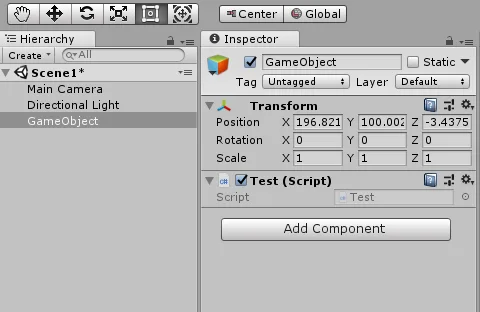
Test.csという名前のスクリプトを作成し、空オブジェクトのGameObjectにアタッチしています。
enum型から数字や文字列へ変換する方法
using System.Collections;
using System.Collections.Generic;
using UnityEngine;

public class Test : MonoBehaviour
{

    public enum Example
    {
        ZERO, // =0
        ONE, // =1
        TWO // =2
    }

    // Use this for initialization
    void Start()
    {
        Debug.Log("enum型" + Example.ZERO);
        Debug.Log("数字" + (int)Example.ONE);
        Debug.Log("文字" + Example.TWO.ToString());
    }

    // Update is called once per frame
    void Update()
    {

    }


}
//実行結果
enum型 ZERO
数字1
文字TWOまず、enum型を定義するときは
public enum Example
{
    ZERO, // =0
    ONE, // =1
    TWO // =2
}
のように宣言します。
enum型から数字へ変換したとき、自動的に上から0, 1, 2 ,...のように数字が割り当てられています。「ZERO = 100,」のように、自分で設定することも可能です。
enum型から数字へ変換するときは、
(int)Example.ONEのように(int)で明示してあげます。
enum型からstring型へ変換するときは、
Example.TWO.ToString()のようにToString()で文字列に変換します。
数字や文字列からenum型へ変換する方法
using System.Collections;
using System.Collections.Generic;
using UnityEngine;
using System;

public class Test : MonoBehaviour
{

    public enum Example
    {
        ZERO, // =0
        ONE, // =1
        TWO // =2
    }

    // Use this for initialization
    void Start()
    {
        Debug.Log("数字からenum型" + (Example)Enum.ToObject(typeof(Example), 1));
        Debug.Log("文字からeunm型" + (Example)Enum.Parse(typeof(Example), "TWO"));
    }

    // Update is called once per frame
    void Update()
    {

    }


}
//実行結果
数字からenum型ONE
文字からenum型TOWenum型へ変換するときは、
using System;をnamespaceに追加してください。
数字からenum型へ変換するときは、
(enum型)Enum.ToObject(typeof(enum型), 数字)のように宣言してください。
文字列からenum型へ変換するときは、
(enum型)Enum.Parse(typeof(enum型), "文字")のように宣言してください。
enum型を使用するメリット
enum型の使用はいろいろ面倒だし、宣言も長いので、使いどころがいまいち分からないと思います。
enum型を使用するタイミングは主に、
・PlayerPrefsのkeyに使用する
・switchの条件分岐に使用する
です。
これらについて説明します。
enum型をPlayerPrefsのkeyとして使用する
using System.Collections;
using System.Collections.Generic;
using UnityEngine;
using System;

public class Test : MonoBehaviour
{

    public enum Example
    {
        ZERO, // =0
        ONE, // =1
        TWO // =2
    }

    // Use this for initialization
    void Start()
    {

        PlayerPrefs.SetInt("ZERO", 100);

        PlayerPrefs.SetInt(Example.ZERO.ToString(), 100);


    }

    // Update is called once per frame
    void Update()
    {

    }


}
PlayerPrefsでは呼び出すときのkeyにstring型を使用します。
このストリング型は手入力なので、keyが増えてくると、タイプミスすることがあります。しかも、PlayerPrefsはkeyが間違っていてもエラーになりません。
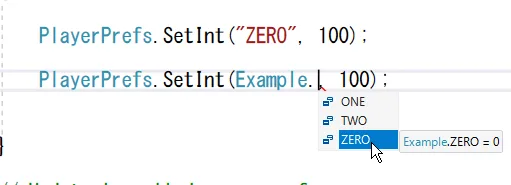
Visual Studio では補助入力機能があり、以下のように候補が表示されるため間違えにくくなります。
enum型をswitchで使用する
using System.Collections;
using System.Collections.Generic;
using UnityEngine;
using System;

public class Test : MonoBehaviour
{

    public enum Example
    {
        ZERO, // =0
        ONE, // =1
        TWO // =2
    }

    // Use this for initialization
    void Start()
    {

        //enum型でswitch
        Example ex = Example.ZERO;

        switch (ex)
        {
            case Example.ZERO:
                Debug.Log("0");
                break;

            case Example.ONE:
                Debug.Log("1");
                break;

            case Example.TWO:
                Debug.Log("2");
                break;
        }


        //int型でswitch
        int a = 1;

        switch (a)
        {
            case (int)Example.ZERO:
                Debug.Log("0");
                break;

            case (int)Example.ONE:
                Debug.Log("1");
                break;

            case (int)Example.TWO:
                Debug.Log("2");
                break;
        }

    }

    // Update is called once per frame
    void Update()
    {

    }


}
//実行結果
0
1switchで条件分けをするとき、
switch (a)
{
    case 0:
        Debug.Log("0");
        break;

    case 1:
        Debug.Log("1");
        break;

    case 2:
        Debug.Log("2");
        break;
}
や
switch (a)
{
    case "ZERO":
        Debug.Log("0");
        break;

    case "ONE":
        Debug.Log("1");
        break;

    case "TWO":
        Debug.Log("2");
        break;
}
のように使用すると思います。
しかし、数字で条件分けだと、あとから見たときに1は何、2は何と分かり辛いですし、文字列でも打ち間違いがあります。
そこで、enum型を使用すると、
//enum型でswitch
Example ex = Example.ZERO;

switch (ex)
{
    case Example.ZERO:
        Debug.Log("0");
        break;

    case Example.ONE:
        Debug.Log("1");
        break;

    case Example.TWO:
        Debug.Log("2");
        break;
}
や
//int型でswitch
int a = 1;

switch (a)
{
    case (int)Example.ZERO:
        Debug.Log("0");
        break;

    case (int)Example.ONE:
        Debug.Log("1");
        break;

    case (int)Example.TWO:
        Debug.Log("2");
        break;
}
のように、可読性の高い条件分けが可能になります。
ただ、残念ながらenum型をstring型に変換したときはswitchでは使用できません(if では使えます)。
//string型でswitchはエラーとなる
string name = "TWO";

switch (name)
{
    case Example.ZERO.ToString():
        Debug.Log("0");
        break;

    case Example.ONE.ToString():
        Debug.Log("1");
        break;

    case Example.TWO.ToString():
        Debug.Log("2");
        break;
}