【Unity】引数ありのコルーチンの使い方とCoroutineを中止させる方法
はじめに
この記事ではコルーチンを利用したアニメーションの一時停止を紹介します。
コルーチン(Coroutine)を使う準備
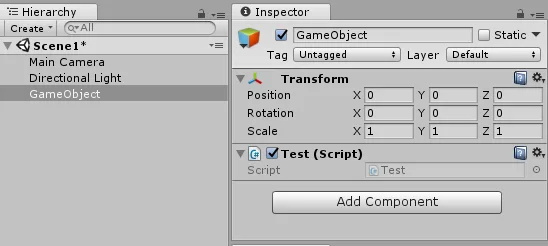
Hierarcy 上で右クリックし、Create Empty で空オブジェクトを設置し、スクリプトをアタッチしてください。
1フレームだけ停止させる場合「yield return null」
using System.Collections;
using System.Collections.Generic;
using UnityEngine;

public class Test : MonoBehaviour
{

    // Use this for initialization
    void Start()
    {
        StartCoroutine("LogCoroutine");
    }

    // Update is called once per frame
    void Update()
    {

    }

    public IEnumerator LogCoroutine()
    {
        for (int i = 0; i < 3; i++)
        {
            Debug.Log(i+"回目");
            yield return null;
        }
    }

}
一時停止させたいときは、「IEnumerator Name() { yield return null;} 」というインターフェース(装置)を作成し、「StartCoroutine("Name");」で呼び出します。
yield return null では1フレームだけ遅延させることができます。
確認したい場合は、以下のコードを試してみてください。
もし、遅延処理なしの場合は「012012」と出力されますが、遅延処理が発生しているので「001122」のように出力されます。
using System.Collections;
using System.Collections.Generic;
using UnityEngine;

public class Test : MonoBehaviour
{

    // Use this for initialization
    void Start()
    {
        StartCoroutine("LogCoroutine");
        StartCoroutine("LogCoroutine");

    }

    // Update is called once per frame
    void Update()
    {

    }

    public IEnumerator LogCoroutine()
    {
        for (int i = 0; i < 3; i++)
        {
            Debug.Log(i+"回目");
            yield return null;
        }
    }

}
n秒間遅延させたいとき「yield return new WaitForSeconds」
using System.Collections;
using System.Collections.Generic;
using UnityEngine;

public class Test : MonoBehaviour
{

    // Use this for initialization
    void Start()
    {
        StartCoroutine("LogCoroutine");

    }

    // Update is called once per frame
    void Update()
    {

    }

    public IEnumerator LogCoroutine()
    {
        for (int i = 0; i < 3; i++)
        {
            Debug.Log(i+"回目");
            yield return new WaitForSeconds(1f);
        }
    }

}
秒数を指定して遅延させたい場合は、「yield return new WaitForSeconds(秒数);」のように使用します。
アニメーションとコルーチンを組み合わせれば、攻撃モーションの後に爆発エフェクトを実行したりもできます。
以下の動画では、爆発エフェクトを実行して、数秒後にエフェクトを停止するコルーチンを使っています。
コルーチンを中断したいとき「yield break」
using System.Collections;
using System.Collections.Generic;
using UnityEngine;

public class Test : MonoBehaviour
{

    // Use this for initialization
    void Start()
    {
        StartCoroutine("LogCoroutine");

    }

    // Update is called once per frame
    void Update()
    {

    }

    public IEnumerator LogCoroutine()
    {
        for (int i = 0; i < 3; i++)
        {
            if (i == 0)
            {
                Debug.Log(i+"回目");
                yield return new WaitForSeconds(1f);
            }
            else if (i == 1)
            {
                Debug.Log(i + "回目 break");
                yield break;

            }
            else
            {
                Debug.Log(i + "回目");
                yield return new WaitForSeconds(1f);

            }
        }
    }

}
コルーチンを強制的に中止させたい場合は「yield break;」を使用します。
今回はfor の i が1になったときにコルーチンを中止させています。
引数ありのコルーチンのを使いたいとき
using System.Collections;
using System.Collections.Generic;
using UnityEngine;

public class Test : MonoBehaviour
{

    // Use this for initialization
    void Start()
    {
        StartCoroutine( LogCoroutine("数字:", 100));

    }

    // Update is called once per frame
    void Update()
    {

    }

    public IEnumerator LogCoroutine(string character, int num)
    {
        Debug.Log(character + num);
        yield return null;
    }

}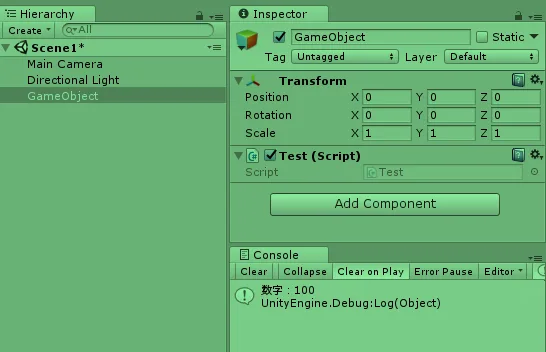
引数のあるコルーチンを使用したい場合は「StartCoroutine( Name(引数));」のように使用してください。