【忙しい人のためのUnity入門講座】 クラスの作成方法と別クラスの呼び出し方
はじめに
この記事ではUnityでクラスの使い方を紹介します。
クラスの作成方法
クラスとは「似たような処理のメソッドや変数を集めたもの」です。
クラス(Class)を作成するときは、「public class Hoge : MonoBehaviour {}」のように記述します。
注意点として、「スクリプトと同名のクラスが必ず1つ必要」であることと、「void start () と update() はスクリプトと同名のクラス内でしか使えない」点が挙げられます。
using System.Collections;
using System.Collections.Generic;
using UnityEngine;
using UnityEngine.UI;

public class Test : MonoBehaviour
{

    // Use this for initialization
    void Start()
    {

    }

    // Update is called once per frame
    void Update()
    {

    }

}

public class Hoge : MonoBehaviour
{

    public void Log()
    {
        Debug.Log("hoge");
    }

}
別クラスの呼び出し方
スクリプト内に作成したクラスを呼び出すには「クラス名 変数 = new クラス名()」のように記述します。
「クラス名 変数」だけだと、変数の中身はカラッポです。ここに new クラス() してあげて中身を代入してあげることができます。
これをインスタンス化といいます。
インスタンス化を完全に理解するのは難しいので、今は使い方だけ覚えればいいと思います。
インスタンス化した別クラスの変数やメソッドを利用するときは、「変数. 別クラスの変数」、「変数. 別クラスのメソッド」のように記述します。
using System.Collections;
using System.Collections.Generic;
using UnityEngine;
using UnityEngine.UI;

public class Test : MonoBehaviour
{

    // Use this for initialization
    void Start()
    {
        Hoge h = new Hoge();

        Debug.Log("a:" + h.a);
        h.Log();
    }

    // Update is called once per frame
    void Update()
    {

    }

}

public class Hoge : MonoBehaviour
{
    public int a = 10;

    public void Log()
    {
        Debug.Log("hoge");
    }

}
実行結果
a:10
Hoge別のオブジェクトにアタッチしたスクリプトの取得方法
以下のように、TestObject と Cube を設置し、それぞれTest.cs と CubeScript.cs をアタッチします。
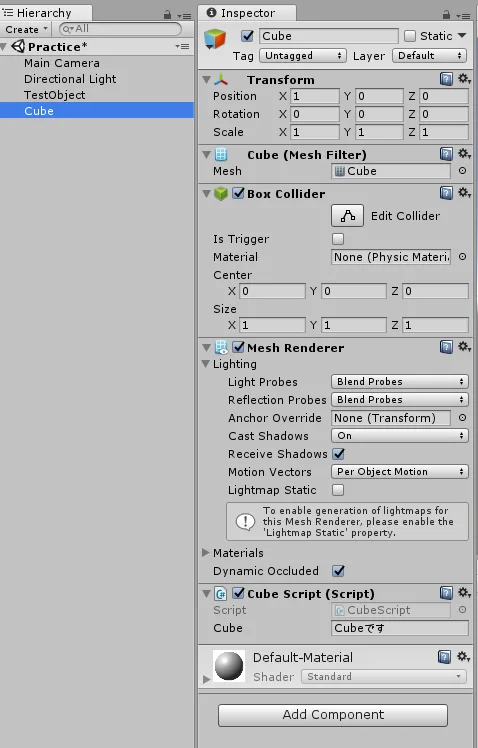
TestObject にアタッチしたTest.cs 内で、CubeにアタッチしたCubeScript.cs を取得するには、「CubeScript 変数 = GameObject.Find("Cube").GetComponent<CubeScript>();」のように記述します。
まず、GameObject.Find("Cube") でCubeを参照し、GetComponent<CubeScript>() でCube にアタッチされたCubeScript.csを取得できます。
取得出来たら、「変数. 変数」、「変数. メソッド」のように記述すれば実行できます。
TestObject にアタッチしたTest.cs
using System.Collections;
using System.Collections.Generic;
using UnityEngine;
using UnityEngine.UI;

//----------------------------------------
//TestObjectにアタッチしたTestスクリプト
//----------------------------------------
public class Test : MonoBehaviour
{

    // Use this for initialization
    void Start()
    {
        //CubeにアタッチしているCubeScriptを取得
        CubeScript cs = GameObject.Find("Cube").GetComponent<CubeScript>();
        cs.Log();

    }

    // Update is called once per frame
    void Update()
    {

    }

}
Cube にアタッチしたCubeScript.cs
using System.Collections;
using System.Collections.Generic;
using UnityEngine;

//----------------------------------------
//CubeにアタッチしたCubeScriptスクリプト
//----------------------------------------

public class CubeScript : MonoBehaviour {

    public string cube = "Cubeです";

	// Use this for initialization
	void Start () {

	}

	// Update is called once per frame
	void Update () {

	}

    public void Log()
    {
        Debug.Log(cube);
    }
}
実行結果

Cubeです